
Summer 2026 Calculator Improvements


Our current development ran from June - September 2026, and this is the place to find details of all improvements and new features released. View all videos in one YouTube playlist here.
w/c 21st September
AI Footprint Builder
Select production paperwork and let AI create footprint activities for you...
- Reads production documents for activity information
- Creates activities for Final Footprints
- Allows users to check activities before saving
- Ensures sensitive data is safe with various security measures
- Allocates the CO2e associated with using the AI-powered feature to the Final Footprint each time it's used
👉 Find out more: It's Here! Get Early Access to AdGreen's AI Footprint Builder 🚀
👉 See the feature in action: Register for the webinar on 30th Sep
w/c 24th August
Analytics for your Final Footprints
Allows users to see data visualisations for all Final Footprints - or a filtered list
👉 See the feature in action: register for the webinar on 14th Oct
Access the new Analytics section from the link in the top navbar, where it will show you various stats, graphs and charts for all of your finished Final Footprints, or a filtered selection.
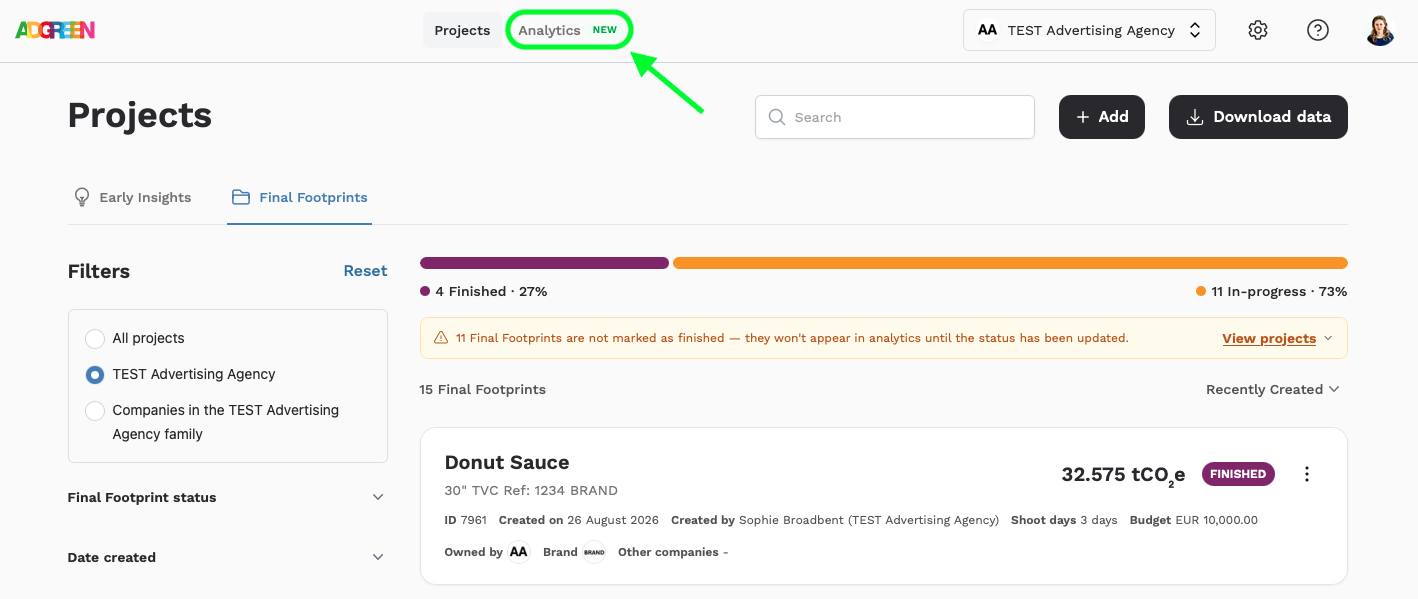
The filters are the same as the project list page, so you can just see projects which are for a certain brand, have a particular tag or feature (such as flights, or studios), or which were created or finished after a certain date.
The Analytics section also includes an information pop up (click the i top right), and the opportunity to download your full/filtered dataset either as an excel, or as a PDF report.
What's included in Analytics
There are four distinct sections on the page, shown in the following screen grabs for a dummy account for a company called 'TEST Advertising Agency'.
Top Stats
This section gives you the headlines for the projects being viewed: the total CO2e, the average project CO2e (and a comparison to the overall AdGreen average, the average number of shoot days for your shoot based projects, and the average budget per shoot day category, for those with budgets which are visible to you.
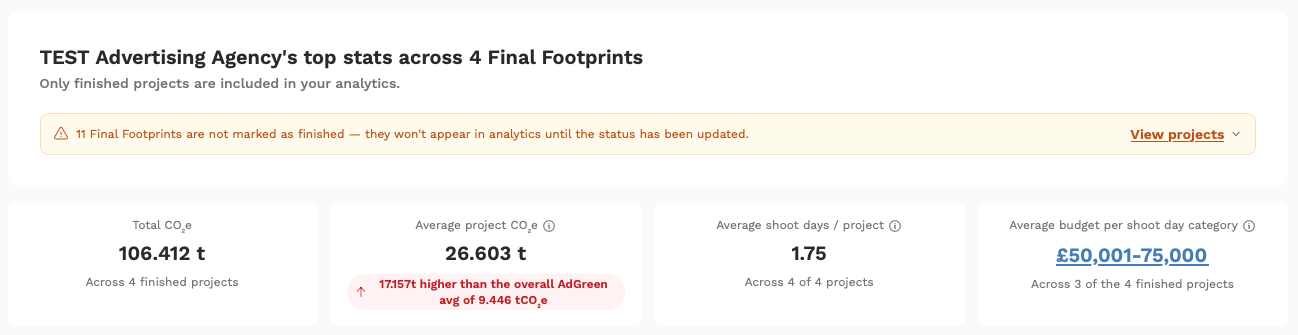
To find out how the AdGreen averages and budget categories are calculated, click here.
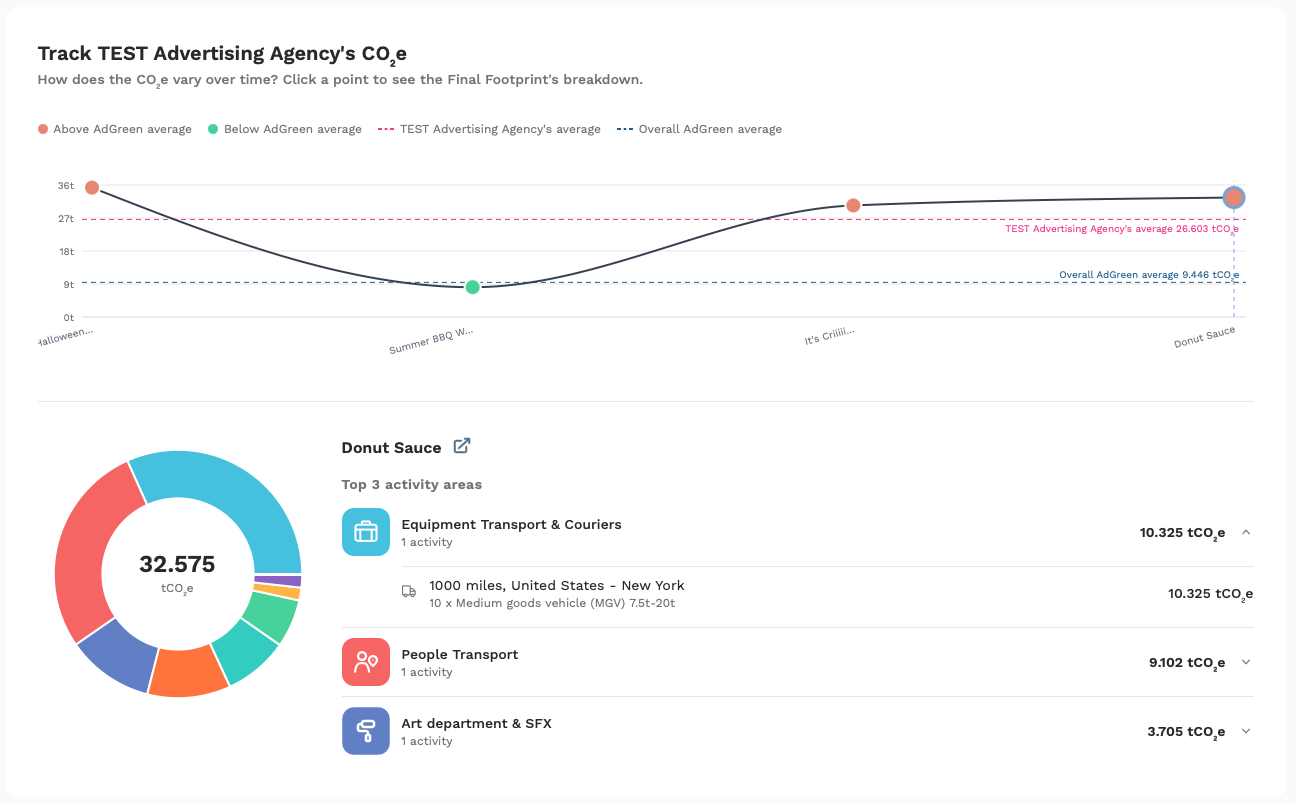
Track your company's CO2e over time
This section shows your productions’ total CO2e over time, based on when the projects being viewed were created. The graph also includes reference lines for your own dataset’s average (shown with a pink dotted line), and the overall Adgreen average (shown as a turquoise dotted line), so you can see how each production stacks up.
Clicking on each project shows the breakdown of CO2e by activity area, and your 3 highest areas along with their associated activities.
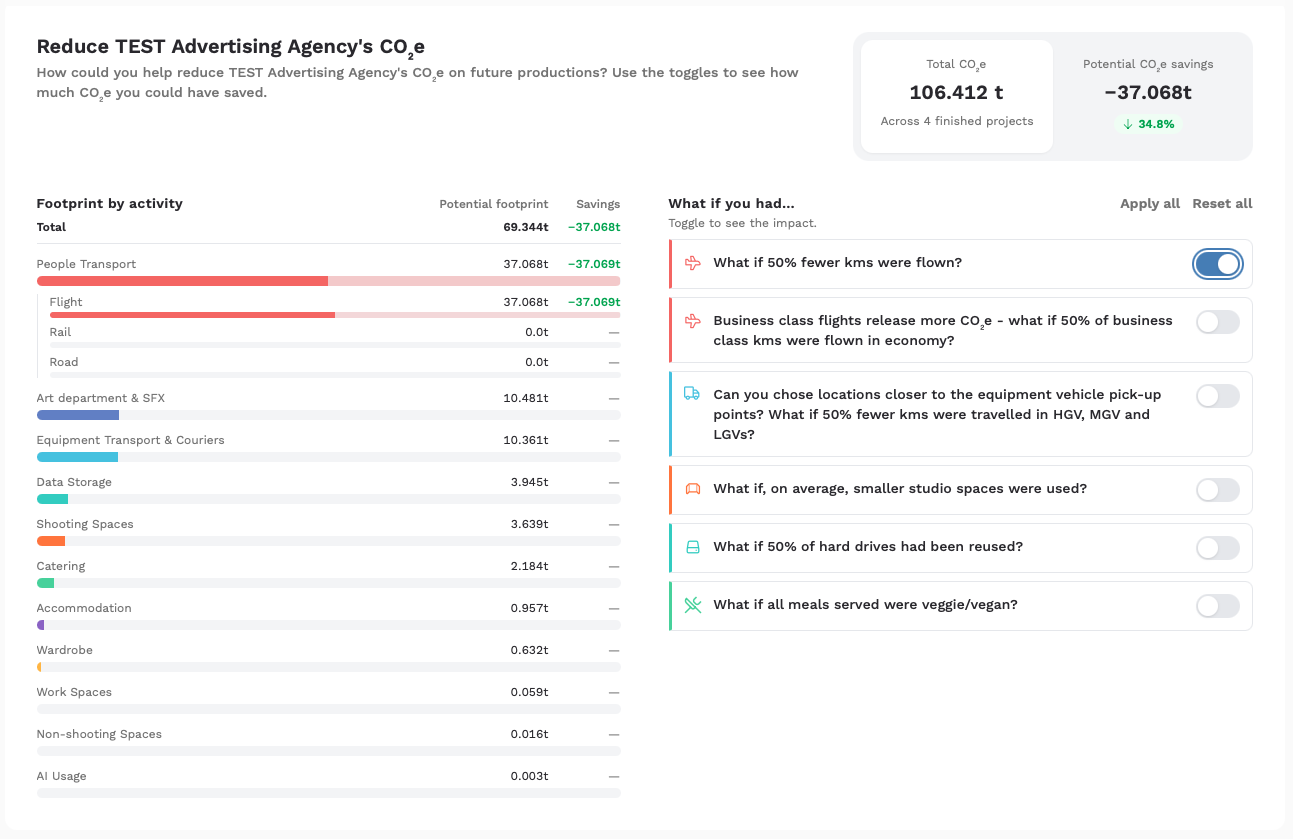
Reduce your company's CO2e
This section shows your total emissions by activity area for the projects being viewed (with additional granularity for People Transport), and gives you the opportunity to see what impact different reduction suggestions might have. Simply toggle them on and off and watch the potential savings add up! Your actual total CO2e for the projects being viewed remains on screen for helpful comparson.
This is designed to help inform policy going forward, assuming you’ll be working on similar projects in the future. For example, if business class flights are your highest area for the dataset you're viewing, you could set a policy around when flying business is sanctioned - and when it’s not - knowing that reducing this will give you the biggest opportunity for reduction. Similarly, if your company has set an overall percentage emissions reduction target, the % reduction will help you see how you can get there.
Compare your company's CO2e
This final section, comparing your company's emissions for the projects being viewed to the AdGreen dataset, is split into three:
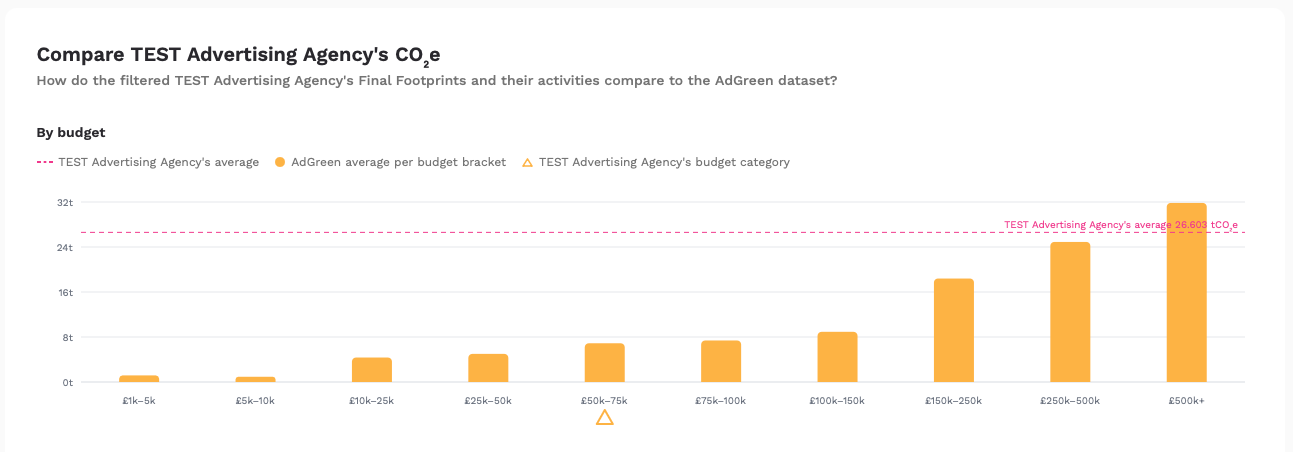
By budget category
This graph shows your dataset’s average with a pink dotted line, and the AdGreen averages by budget category. The category your projects fall into is indicated by a yellow triangle, so that you can see how your average compares.
By project type
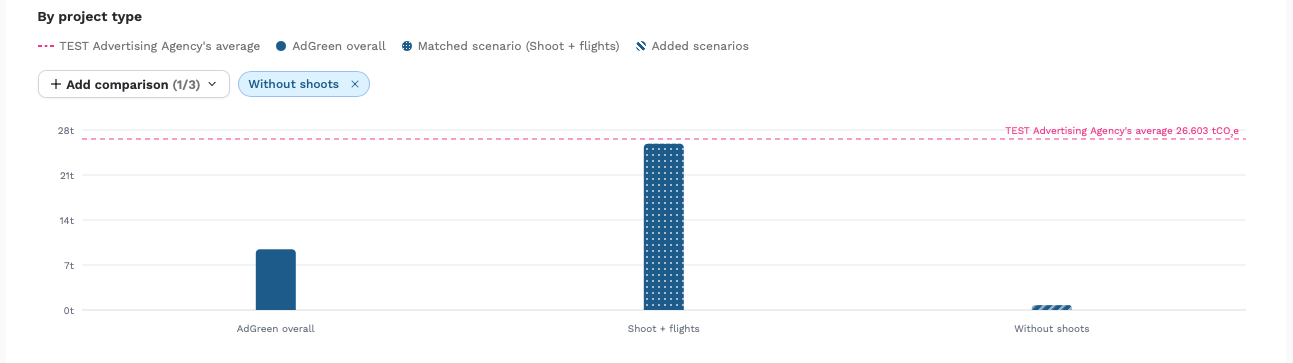
This graph shows your dataset’s average with a pink dotted line, and the AdGreen overall average and the ‘matched scenario’ as bars on the graph.
The overall AdGreen average covers a wide range of projects, so by showing you the matched scenario, we’re showing you what the average CO2e is for projects that have the same elements as yours, for a closer comparison. For example, if your dataset includes shoots and flights, the Shoot + Flights scenario is shown as well. This reacts as you filter your projects, always keeping the most relevant scenario on the graph.
If you want to add another scenario for reference, you can use the + Add comparison button to add up to 2 more. In the example below, the 'Without shoots' average has been added.
By activity area
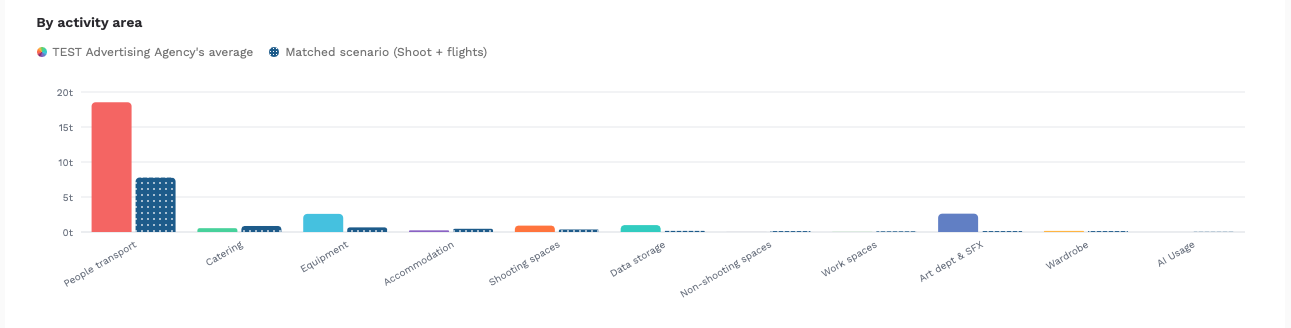
Finally, this graph shows your average emissions by activity area (in the activity area colours), against the average emissions by category for the matched scenario (in navy), so that you can see how your CO2e compares across the various activities. For example, you may be higher in one area, but lower in others.
See us talk through all 3 graphs here:
w/c 10th August
New help icon brings together useful resources in one place
Look for the new ? icon in the top right
This menu brings together links for:
- Videos on our YouTube channel, including one for each update and new feature plus those for the basics such as registering and adding a new Final Footprint
- The How To guide on our website which walks you through using the tool, step by step
- Our reports page where you can download all of the annual reviews
- Our reduction guides page with guides tailored to production companies, creative agencies and brands
w/c 3rd August
Gave up creating a new company because you couldn't find a logo? Now they're auto-generated
You can always change it later...
We know a few people got stuck setting up new companies because step 2 (of 2) required logo and they weren't always easy to find. So to combat this, the system will now auto-generate a logo for you. So if you're part way through, jump back in and you'll see you no longer need to find one - then you can finish creating the profile and get started with measuring!
w/c 27th July
See your Final Footprint details and collaborators more easily, plus a new Actions button
A refresh for the Final Footprint page
Looking at a Final Footprint and trying to remember what companies are working on it with you? We know, the details were a little hard to find! So now we’ve added everything you need to the top of the page, including any brands and other collaborators you’re working with, plus the number of shoot days and budget (if visible to your company). In addition, the Actions button has everything you need, including: Mark a project as finished, add other companies and tags, and download PDF analytics reports as well as data in excel format.
Plus, you can now add companies to a Final Footprint, even when it’s finished. So if you want to include another company for visibility, go for it.
w/c 20th July
The all new progress bar…
A helping hand towards superuser-dom
Keeping track of the Final Footprints that still needed to be finished wasn’t the easiest, so now we’ve added a progress bar on the Final Footprint list page, to help you visualise how many Final Footprints are in progress, vs those which have been finished. With many companies trying to finish their Final Footprints before the end of the year this should be the helping hand you need. Forgotten to add an activity? Don’t worry, just use the 3 dot menu to revert to in progress, add what’s missing then hit the finish button again.
The progress bar also updates when you filter, so if you want to see how many projects are left to finish for a particular brand, or time period, filter away!
w/c 13th July
Want to filter by shoot, shooting space type or flights? Or date finished instead of date created?
Now you can with these new filters for Final Footprints
You asked, we delivered! For those wanting to filter Final Footprints to include or exclude those with shoots or flights, or view only those that include studios or locations, now you can. And for users who want to work with date finished instead of date created (as AdGreen does, when creating the annual dataset each yet), there’s a filter for that too. Get yourselves familiar with them - they’ll be available in the upcoming analytics section too.
A new look Download Data button
Download your Final Footprints in excel format whenever you like
The eagle eyed amongst you have already been downloading your data using the download button, however we’ve now made it a little bit more obvious! So here’s a refresher for those who might need it.
w/c 6th July
Arrival of the set build benchmark in Final Footprints
Struggling to add art department materials?
You may already be familiar with the set build benchmark, as it’s in Early Insights, and we’ve now added it to Final Footprints too. So if you’re unable to get specific weights for the various art department materials you may have used on your production, use the benchmark option instead. Simply indicate where the shoot took place and how many of each size set build your shoot had, and the relevant materials will be added for you.
This information is also reflected on your data export (download this via the button on the project list page), so that you can see how many times actual data was recorded, vs using the benchmark.
w/c 29th June
Ability to indicate how many previously purchased drives you’re reusing
A way to capture your production's reduction efforts
Many of you wanted a way to record hard drives you were reusing, as well as those you were purchasing new - now you can on both Early Insights and Final Footprints. Simply enter how many of each and we’ll calculate the CO2e accordingly: 0kg for anything reused, and 200kg for anything newly purchased.
Again, this information is also reflected on your data export, so that you can analyse the extent to which you’re purchasing new drives vs reusing them.
Download your Final Footprint’s analytics report directly from the burger menu
Measurement of text, image and video responses now available in both Early Insights and Final Footprints.
Now as well as managing users, adding tags and duplicating Final Footprints (among many other fun actions), you can download your analytics PDF directly from the burger menu, without needing to open the Final Footprint and go to the analytics tab. Easy peasy.
w/c 22nd June
Shiny new admin area!
Click the cog to manage users, company settings and your company’s family tree
We’ve updated the settings admins have access to so that they’re all in one place - found by clicking the cog between the company name and the icon where you’ll find your personal settings and the log out button.
Once you click on the cog, you’ll find the admin area with three distinct tabs:
Manage users
See active users including the date they joined your company and when they were last active - plus change their role and/or delete them using the buttons. You can also invite new users - and resend or cancel their invites as necessary, and manage any requests from users to join your company.
Company settings
Here you can update the company logo, name and location, as well as any domains that have automatic access (to save you needing to approve requests).
Family tree
Here you can view your company’s family tree, i.e. any parent company which has been added (which you can also add/edit if needs be), as well as any child companies - those who have added your company as their parent. You can also download this tree to pdf.
Can’t see the cog? It just means you’re not an admin for that company, instead you’re a user. Need to manage some of these settings? Ask your admin to upgrade you or get in touch with us if you’re unsure who that is.
Got a notification next to the cog? That means there’s one or more requests from users to join your company. Click the cog to manage them.